
Umbraco + AI: What exists today and what is on the way?

News
7 min
News
7 min
To say that AI development is progressing at a frightening pace may not be sticking your neck out directly. New models are coming almost every day, and the development does not seem to be slowing down anytime soon. But how can one implement and benefit from it in Umbraco? We will clarify that in this post!
When we wrote about Umbraco 17 (blog post 1, blog post 2) and its release last year, we mentioned Umbraco MCP as one of the major new features. Since then, quite a lot has happened, and Umbraco now has a much broader and clearer strategy for how AI should become part of the platform.
Umbraco divides this into two different areas:
- AI in Umbraco is about how we can use AI features directly in the editor experience and on the website. Everything from generating alt text to semantic content search.
- Umbraco in AI is the other way around. It’s about making Umbraco accessible to the AI tools we already use, such as ChatGPT, Claude, GitHub Copilot and other AI tools.
Let’s dig a little deeper!
AI in Umbraco
Umbraco’s philosophy around AI is that the CMS and the AI layer should remain separate. That’s why Umbraco has created something called Umbraco AI. It isn’t a ready-made AI feature in itself, but rather a shared layer that other AI features can build on.
A major advantage of Umbraco AI is that the solution isn’t tied to a specific model or AI provider. You can use models from OpenAI, Anthropic and Google, for example, and switch providers without having to rebuild the rest of the AI solution. And the best part? Umbraco AI itself is free and open source! The main cost instead comes from the API calls made to the models.
The basic idea is that the CMS itself should remain stable while the AI layer on top can evolve quickly. Pretty smart, considering an AI model can feel old and outdated just weeks after its release. To standardize how AI is used within Umbraco, functionality has been built around this, including Profiles, Context and Guardrails.
With Context, you can define your company’s tone of voice, writing guidelines, target audiences and other instructions that are useful for the AI to know. Profiles can then be created for different purposes. Your privacy policy, for example, probably shouldn’t use the same playful tone as the rest of the website, while your “Work with us” page probably shouldn’t sound overly legal and formal.
With Governance and Guardrails, you can set clear rules for the information sent both to and from the AI. For example, you could prevent the AI from using words such as WordPress, Sitevision and Optimizely on a page about Umbraco. You can also make sure certain sensitive information is blocked so that it isn’t sent to AI models at all.
So, what has been built on Umbraco AI?
Umbraco AI Prompt
With Umbraco AI Prompt, you can add predefined actions at field level. Let’s say you have a summary field on a content page. You can add a button next to the field that automatically generates a summary based on the text in the main content field.
Umbraco Copilot
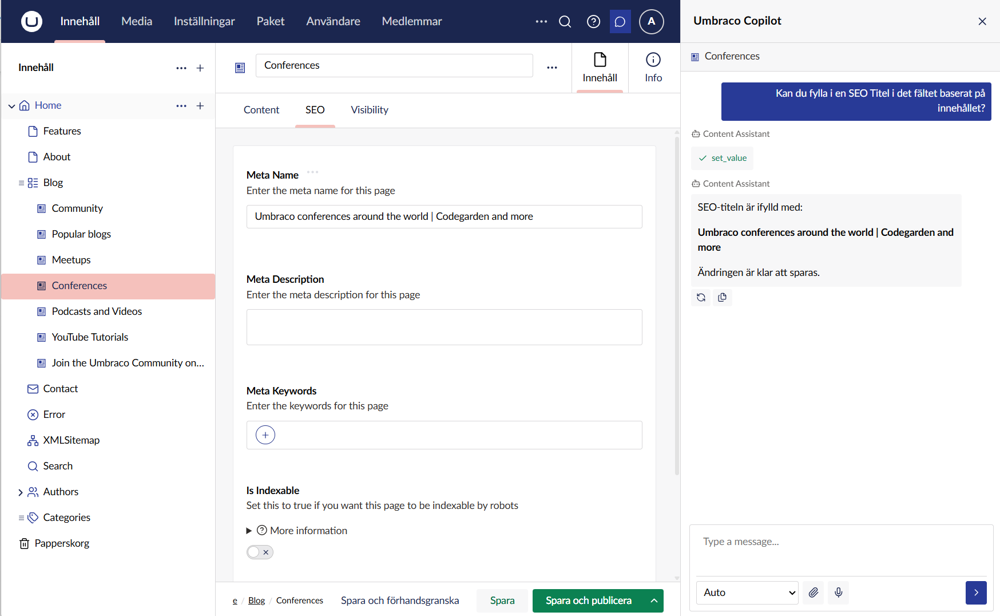
Wish you had a little AI chat window on the side to help you while working with content in the Umbraco backoffice? That’s where Umbraco Copilot comes in. And the best part? It knows which page you’re on and understands the content and structure of that page. Using its other tools, it can also find and work with content from other parts of the website.
It can even make changes directly to the content on the page the editor is working on. For example: “Can you shorten the introduction and make it a little more sales-focused?” or “Can you fill in the SEO title and SEO description based on the content on this page?”
Umbraco Copilot Workspace
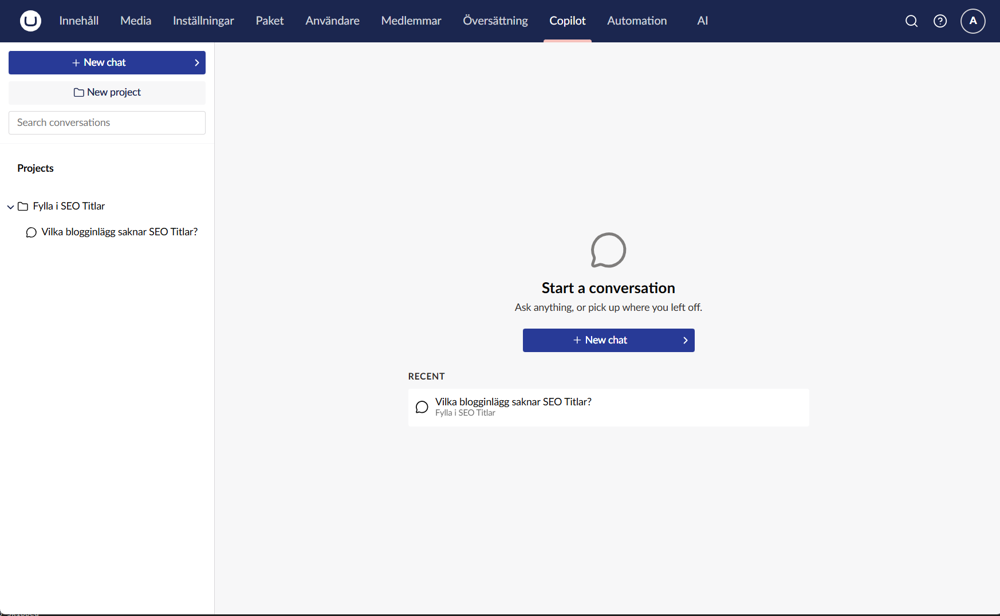
The next step is what’s called “Copilot Workspace”.
Instead of having the chat assistant sitting in the corner, it gets its own dedicated section in the backoffice. The focus here is more on larger tasks and working across multiple pages. It includes features such as chat history and Projects, where you can give the AI additional context and instructions.
At the time of writing, Copilot Workspace is available as a Release Candidate, meaning the feature is close to a full release but is still being tested.
Umbraco Knowledge Sets
Knowledge Sets let you give the AI additional knowledge and instructions it can use while working. This could, for example, include documentation and instructions related to an installed package. That way, the AI doesn’t have to guess how different parts of the solution work.
Umbraco AI Search
A traditional search is good at finding exactly what you type, but not much beyond that. With AI-powered semantic search, users can get relevant results based on the meaning behind their search, even when the exact same words aren’t used in the content. This means synonyms and similar phrasing don’t cause the same problems as they do with traditional text search.
That’s why Umbraco has developed Umbraco.AI.Search, where content is indexed for semantic search. This can improve the user experience and make it easier for visitors to find the content they’re looking for.
Umbraco.AI.Search is currently in beta, which means it’s available to test but is still under active development.
Umbraco Automate + AI
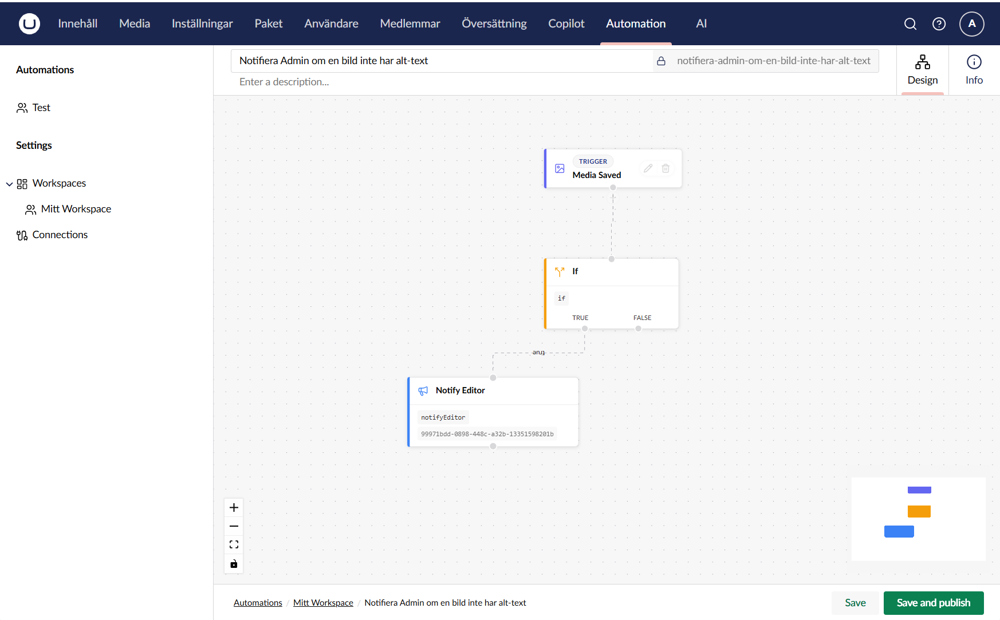
Another perfect use case for AI is Umbraco Automate. Automate is a package developed by Umbraco for building automated workflows using triggers and actions. And AI can be added to those workflows too.
For example, why not automatically let AI generate alt text when a new image is uploaded to the Umbraco media library? Or ask AI to summarize what has changed when an editor publishes new content and then send that summary as a Slack message? Or automatically create a draft English version whenever new Swedish content is published? The possibilities are endless!
The AI integration with Automate is still in alpha and therefore at an early stage of development.
Umbraco Engage.AI
Umbraco’s marketing package, Umbraco Engage, has also gained the ability to connect with Umbraco AI. With the help of Umbraco Copilot, you can now get assistance identifying which campaign performs best, which pages perform best or how different audiences behave.
Umbraco Engage.AI is currently in public beta, meaning it’s available for public testing but is still being developed and may change.
Build your own
In addition to the existing packages, you can of course build your own solutions on top of Umbraco AI. It’s there as a foundation to build on. So the only limit is your imagination!
Umbraco in AI
Now it’s time to turn things around. Instead of bringing AI into Umbraco, we’ll focus on the opposite: how can we make Umbraco accessible to AI?
Open Source
Another advantage when it comes to AI-assisted development is that Umbraco is open source. Since the source code is open, AI agents can access it and investigate how the CMS actually works instead of relying solely on documentation.
MCP
MCP stands for Model Context Protocol, a term that’s appearing more and more when talking about AI agents. It’s an open standard for how AI agents can connect to different systems and use their tools and data in a structured way. And, of course, Umbraco is one of those systems.
With MCP, Claude, Codex or other AI clients that support MCP can communicate with and perform tasks directly in Umbraco instead of you having to do everything yourself. And there are several MCP servers available.
For developers, there’s the Umbraco CMS Developer MCP, which can be used when developing Umbraco websites. It can, for example:
- Create document types
- Create and update content
- Work with media
- Create Dictionary Items
- Manage data types
- Analyze the structure of an Umbraco installation
Umbraco Forms MCP
There’s also an MCP for Umbraco Forms. It allows an AI agent to work with forms, data sources and submitted form responses, among other things. Forms MCP can also be connected to CMS MCP, allowing an AI agent to work with both content and forms within the same workflow.
Umbraco Commerce MCP
Umbraco Commerce has its own MCP as well. Here, AI agents can work with orders, discounts and analytics data from Commerce, among other things. Commerce MCP is still a Proof of Concept, meaning it’s an early implementation primarily intended to demonstrate what’s possible.
For editors, there’s a customized version called CMS Editor MCP. Instead of focusing on the structure and development of an Umbraco website, it focuses on the content itself. For example, you could ask it to:
“Find all news articles from 2025 that are missing an introduction.” or “Create a draft for a new page based on this brief.”
And the best part? It will also be possible to connect an AI client directly to your Umbraco Cloud project and work with the environment through what’s called Remote MCP in Umbraco Cloud.
The roadmap also includes a Content Delivery MCP, which gives AI read-only access to published content and media through Umbraco’s Delivery API. This means AI tools can analyze and understand what is actually published on the website without being able to change the content.
To sum it up:
- Developer MCP: build and modify Umbraco.
- Editor MCP: work with content.
- Forms MCP: work with forms and submitted responses in Umbraco Forms.
- Commerce MCP: work with data and functionality in Umbraco Commerce.
- Content Delivery MCP: understand published content, read-only.
Umbraco CMS Developer MCP is available today. CMS Editor MCP and Hosted Remote MCP for Umbraco Cloud are currently under development, with Q3 2026 as the target release. Content Delivery MCP is also on the roadmap but currently has no announced release date.
Skills
MCP gives AI agents the tools they need to do things in Umbraco, but they also need to understand how those tools should be used. That’s where Skills come in.
Skills are structured instructions and best practices that help AI agents understand how Umbraco works and how to work with it effectively. Today, there are more than 60 Skills for developing the Umbraco backoffice, with more on the way for areas such as content modeling and general implementation.
AI from two directions
Perhaps the most interesting part isn’t any single AI feature, but the fact that Umbraco is approaching AI from both directions. On the one hand, AI is becoming a natural part of the CMS itself. On the other, Umbraco is becoming accessible to the AI agents and tools we already use.
As you can see, there’s a lot happening in Umbraco when it comes to AI, and new things are being introduced all the time. Exciting times ahead!
Read more

List item to the main list: what does it mean for the website?
When a company moves from a growth market like First North or Spotlight to Nasdaq Stockholm's main list, the requirements for transparency, reporting, and corporate governance increase. This is also noticeable on the web. Here we describe what changes and how you can prepare the website for a listing change.
2min

Time to switch platforms? Signs that the destination's website has done its job
Many destinations have a website that was built several years ago. It works, but every change takes time and costs money. Here we go through common signs that it is time to switch platforms and what a change can bring.
2min

Therefore, the booking system and the website should communicate with each other.
A destination often uses several systems simultaneously. Accommodations are booked in one system, ticket purchases or activities in another, and the information about the guests is in a third. When the systems are not connected to each other, the information on the web becomes incorrect or must be moved manually. Here we explain what an integration means and what it does for both the guest and the staff.
3min

From winter to summer: a website that adapts to the right season
For many destinations, the operations change several times a year. The ski slope becomes a bike park and the bathing season transitions into conference season. The website needs to keep up with each transition without a developer having to be involved every time. Here we go through what usually changes between the seasons and how a flexible website makes the switch easier for the editors.
2min

Therefore, you are losing visitors on the way to booking and how you can get more to book directly.
Many who visit a destination's website have already decided to go there. They have read about the activities and compared accommodations but still leave the page without booking. Often, this is because the path to booking has too many steps or feels uncertain. In this post, we will go through common reasons why visitors drop off and how a clearer booking flow can get more people to book directly with you.
3min

Central control, local freedom: who decides what on the group's websites?
When many companies share a platform, new questions arise. Who gets to change what and which content should be managed centrally? Here we describe how corporations can organize editorial work so that it becomes both efficient and secure.
2min

Template or custom? Two paths for the corporation's websites
All companies in a group do not have the same needs. A smaller subsidiary may need a simple website that can be set up quickly, while a larger company may require a completely custom solution. In this blog post, we describe how groups can combine a common template with tailored solutions.
2min

After the listing: how to manage the IR website in everyday life
The listing day is just the beginning. Then come quarterly reports, annual meetings, press releases, and changes in management, year after year. An IR website that was ready on time but is difficult to manage quickly becomes a burden. In this blog post, we go through what the IR year usually looks like and what makes management easy.
2min

New company in the group: how the web will be set up without starting over
Every acquisition raises the same question: what do we do with the website? Without a common foundation, the answer is often a new web project from scratch. Here we describe how a common platform makes it faster and cheaper to connect new companies.
2min

IR-webb in two languages: therefore, the investor information needs to be available in English.
Foreign investors own a large portion of the shares on the Swedish stock exchange. For them, the English IR website is the company's face to the outside world. Yet, the English version is often thinner or less updated than the Swedish. Here we go through why language matters and how you can keep both versions up to date.
2min

Can the group's companies share a web platform and still maintain their brands?
When a group wants to consolidate its websites, a common concern is that the companies will lose their identity. However, a shared platform does not mean that all websites have to look the same. Here we explain how multiple brands can share technology and features while still having their own expression.
2min

This is how you keep the corporate governance section of the IR website up to date: Content and update procedures
The corporate governance section of the IR website is often the one that is updated the least frequently and therefore becomes outdated the easiest. At the same time, this is where investors and analysts look for information about who is in charge of the company and how. Here we go through what content is usually available and how it can be kept updated.
3min

Ten companies, ten websites: when is it time to consolidate the group's websites?
In many corporations, each company has its own website, built at different times by different agencies in different systems. It works for a while, but over time the websites become expensive to manage and difficult to overview. Here we go through the signs that it is time to consolidate the websites and what the corporation gains from it. As an example, we explain how Toxic and Industrireklam consolidated the Weland Group's companies into Weland Light, a common template in Umbraco where changes are rolled out to multiple websites simultaneously.
3min

On the way to the stock market: this needs to be on the web by the listing day
Before a listing, the checklist is long. The website often ends up far down, even though it must be ready and accurate on the same day the stock starts trading. Here we go through what the website needs to be ready for at the listing and how you can plan the work so that it doesn't become a bottleneck.
2min

Multiple facilities, one web platform: how to simplify everyday life for the editors
At many destinations, the hotel, restaurant, ski resort and campsite each have their own website, developed independently over time. The result is duplicated work for content editors and a fragmented experience for guests. In this article, we explore what happens when multiple websites are brought together on a single platform and how Isaberg Mountain Resort approached the challenge.
3min

5 reasons why large organizations and associations choose Umbraco as a CMS
Many large organizations and associations are using CMS solutions that have become too expensive, too complex, or simply no longer fit the business. Editors struggle with things that should be simple, and the technology begins to set limits on what the organization can do. After working with organizations such as LRF, the Tenants' Association, and several sports federations, we see some recurring reasons why the choice often lands on Umbraco CMS.
3min

Why more and more companies are digitizing their B2B sales and how it works
Many B2B companies still receive orders via email, phone, or through their salespeople. It often works well at first, but as the number of customers and order volumes grow, it becomes difficult to keep the information updated and the process becomes too time-consuming. This is one of the most common reasons why more B2B companies are now taking the step towards their own e-commerce platform. In this post, we will go through how orders are often handled today, what problems it creates, and how a digital platform changes the picture.
3min

Therefore, you should stop stressing about your AI ranking.
The question arises everywhere: “How do we rank in ChatGPT?” It's a good question because AI search is starting to become an important channel for digital marketing and no one wants to risk falling behind. But before you hire someone who promises to “optimize your AI ranking,” you need to know something. There is no real ranking.
2min

That's why you are losing customers in your B2B trade - and what you can do about it.
In B2C e-commerce, the purchasing experience often revolves around inspiring and enticing. In B2B, it's the opposite. Customers already know what they want, they have probably ordered it before and want to do it again – as quickly and smoothly as possible. Yet, it is surprisingly common for B2B stores to be built with the same logic as consumer retail. This creates unnecessary friction, frustrates customers, and leads to manual work that no one really has time for. So, what does a truly smooth purchasing experience look like in B2B?
3min

When do organizations need to rebuild or redesign their website?
Many organizations use their website for many years without major changes. This is rarely a problem in itself – a website does not need to be rebuilt just because it is old. The problem arises when the technology, content, or visitors' needs have changed more than the website has managed to keep up. It is not always easy to see where the line is between "this we can fix" and "this requires us to rebuild from scratch." Here are four signs worth taking seriously.
3min

Common problems on large websites and how they can be solved
The larger a website grows, the harder it becomes to manage – both for those who visit it and those who work on it every day. What was once a clear structure with a few sections becomes, over time, hundreds of pages, countless subcategories, and content that has been added in batches over several years without a common plan. The result is rarely noticeable all at once; instead, it sneaks in until one day the visitor can no longer find what they are looking for, while the editor no longer knows where something should be. Now we will go through some of the most common problems on large websites and what usually tends to solve them.
3min